


Frequently Asked Questions
- How can I make sure the platform is working properly ?
This question often comes up when the platform freezes, when changes are not saved, or when tokens do not appear. The first thing to do is refresh either the platform, using the small refresh button at the top left of the platform’s web page, or the web browser, using F5 in Mozilla Firefox or the circular arrow next to the URL in all browsers. Finally, for a successful workshop, you need to clear your browser cache before creating and launching the workshop.
- Is there an English version of the My Earth in 180’ workshop ?
No, there is currently no official English translation of the workshop. However, alternatives are possible thanks to the built-in translation tools in various browsers. This works with a few minor bugs in Firefox version 126.0, 64-bit, Chromium version 125.0.6422.112, 64-bit, and Brave version v1.66.115.
- Is the workshop in person, online, or hybrid ?
All options are available. Developed during the COVID-19 lockdown, the workshop was originally designed to be entirely online. Over time, as demand for in-person workshops grew, we refined the workshop to ensure an optimal experience whether in person or online. Although a hybrid format is possible, it is less enjoyable and less effective, which is why we prefer either fully in-person or fully remote sessions. Note : this applies to a single workshop group, but one group can meet in person while another joins remotely at the same time.
- Is the game platform compatible with all web browsers ?
The answer is not simple. In theory, yes, the platform works on all browsers and operating systems. However, there are sometimes issues with certain browser updates or extensions that can slow down the platform or even cause bugs. We therefore recommend testing the platform before a session and avoiding browser or extension updates the day before a session. Finally, we confirm that it works on Linux 64-bit with Firefox version 134.0 and Chromium version 132.0.6834.83, with the post-it bug in Chromium resolved.
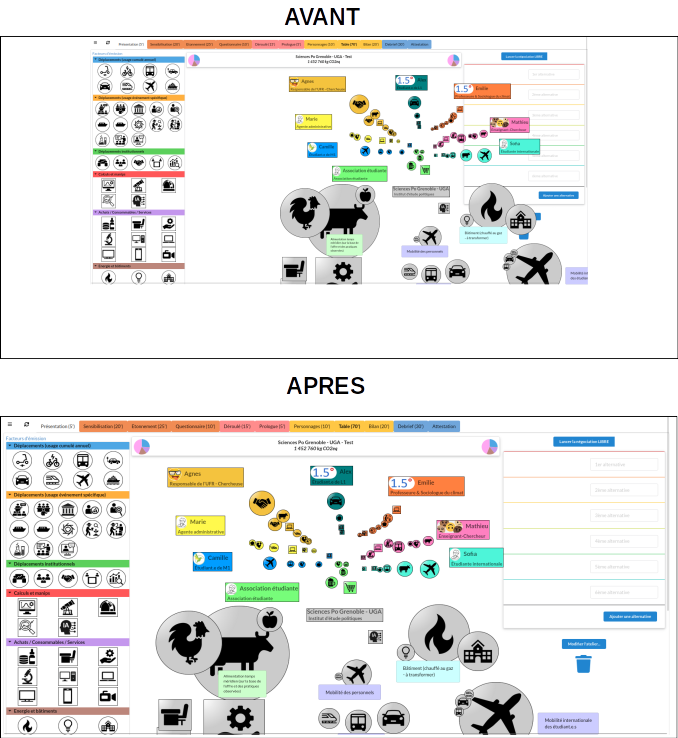
- Are your tiles misaligned on the screen ? How can you resize the My Earth in 180’ window to fit your browser ?
A quick adjustment will solve the problem, as shown below. First, adjust the zoom level of your web browser so that the screen of the My Earth in 180’ platform fills the entire browser tab. The keyboard shortcuts Ctrl + and Ctrl - usually work for this in most browsers. Once you have done this, click the refresh button at the top left of the My Earth in 180’ platform, to the left of the “Presentation” tab, or refresh your web browser.
- Why is the My Earth in the Classroom website unavailable ?
The website URL is undergoing a licence renewal in May 2026 ; it should be accessible again shortly. In the meantime, the role-playing platform is still accessible at this address http://ma-terre.u-ga.fr/MaTerreenclasse, and your account and previous workshops are still saved.
